

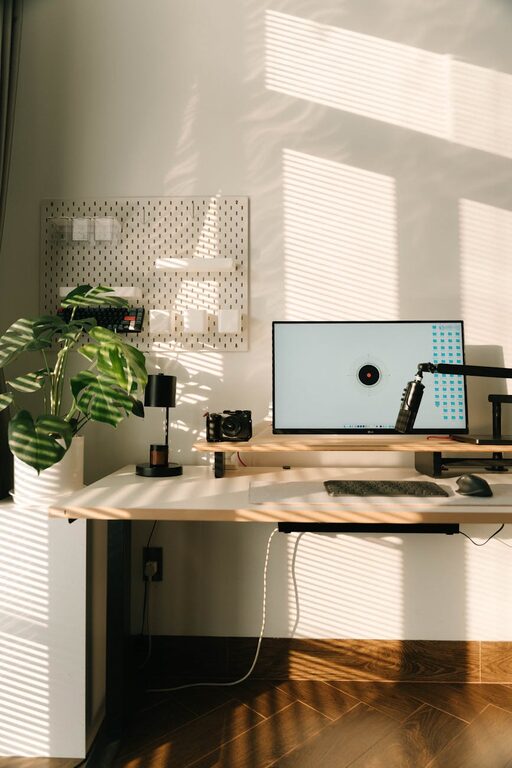
Creating a productive home office environment is essential for anyone working remotely or managing tasks from home. Without the right setup, distractions and discomfort can easily reduce your efficiency and motivation. Thankfully, with some thought and simple adjustments, you can design a workspace that encourages productivity and supports your well-being. Here are some helpful tips to get you started.
Choose the Right Location
Selecting the ideal spot for your home office is the foundation of productivity.
– Quiet and Private: Choose a space away from household noise and high traffic areas to minimise interruptions.
– Natural Light: Position your desk near a window if possible. Natural light improves mood and helps regulate your body clock.
– Space for Movement: Ensure there is enough room to stretch or move comfortably during breaks.
If space is limited, consider a fold-away desk or designate a specific corner for work that you can tidy easily.
Invest in Ergonomic Furniture
Comfort is critical when working for long hours. Poor posture can lead to discomfort and decrease focus.
– Supportive Chair: Use a chair that supports your lower back and promotes good posture. Adjustable height and armrests are a bonus.
– Appropriate Desk Height: Your desk should allow your arms to rest naturally on the surface with elbows at around a 90-degree angle.
– Monitor Position: Place your computer screen at eye level to avoid strain on your neck and eyes.
Ergonomic accessories such as footrests, wrist supports, or laptop stands can also enhance comfort.
Keep Your Workspace Organised
A clutter-free environment helps you concentrate and reduces stress.
– Storage Solutions: Use shelves, filing cabinets, and desk organisers to keep documents and supplies tidy.
– Daily Clean-Up: Spend a few minutes at the end of each day clearing your desk to start fresh tomorrow.
– Cable Management: Use clips or covers to keep cords and cables neat and out of the way.
Consider digitising papers to reduce physical clutter and make it easier to find information.
Optimise Lighting
Proper lighting prevents eye strain and keeps you alert.
– Layered Lighting: Combine natural light with adequate overhead and task lighting. A desk lamp with adjustable brightness is useful.
– Avoid Glare: Position screens perpendicular to windows and use blinds or shades if sunlight causes glare.
– Warm Light for Comfort: Using bulbs with a warm colour temperature can create a relaxing atmosphere without dulling focus.
Regular breaks from screen time to look at distant objects can also reduce eye fatigue.
Minimise Distractions
Reducing disturbances helps maintain your concentration during work hours.
– Set Boundaries: If you share your home, communicate your work schedule clearly to others.
– Use Noise Control: Consider noise-cancelling headphones or white noise machines if background sounds are distracting.
– Turn Off Notifications: Silence non-essential phone or computer notifications during focused work sessions.
Organising your day with scheduled breaks can also help manage attention and refresh your mind.
Personalise Your Space Thoughtfully
A personalised workspace can boost motivation but avoid over-cluttering.
– Inspiring Decor: Add plants, artwork, or personal items that make you feel comfortable and positive.
– Keep it Professional: Ensure the environment stays appropriate for video calls or meetings.
– Colour Choice: Soft, neutral colours promote calm and focus, while small accents can energise the space.
Remember that your workspace should feel inviting without being overwhelming.
Establish a Routine
Creating and sticking to a routine helps separate work from home life.
– Regular Hours: Set consistent start and finish times where possible.
– Dress for Work: Changing into work clothes can mentally prepare you for the day.
– Scheduled Breaks: Use techniques like the Pomodoro method (25 minutes work, 5 minutes rest) to maintain productivity and avoid burnout.
End your day by tidying your area and switching off work devices to signal downtime.
Ensure Good Connectivity and Equipment
Reliable technology is essential for seamless remote work.
– Stable Internet: Check your connection speed and consider upgrading your router or provider if needed.
– Quality Equipment: Use a comfortable keyboard, mouse, and webcam for professional communication.
– Backup Options: Have spare chargers, batteries, or power inverters to avoid disruptions.
Regularly update software to improve security and performance.
—
By applying these tips to your home office setup, you can create a space that promotes productivity, comfort, and well-being. A thoughtfully designed environment supports focused work and helps you maintain a healthy work-life balance. Remember, the best home office is one tailored to your specific needs and lifestyle, so feel free to adapt these suggestions to fit your personal preferences.